

Parent-linked accounts
A parent can link a child's account, set screen-time limits and manage safety settings together with them.
Safegram is built to be safe social media for teens and families. We use age-appropriate defaults, in-app reporting, moderation and verified profiles to reduce risky interactions — but parents and guardians still need to supervise children online.
A parent can link a child's account, set screen-time limits and manage safety settings together with them.
Younger accounts start private, with limited discoverability and stricter messaging permissions.
Verification means teens are far more likely to be interacting with real, accountable people.
Private conversations stay private. We give families safer defaults, not surveillance over a teen's messages.
We do not target advertising at minors and we do not build ad profiles from their activity.
Reports involving minors jump the queue and are handled under our Child Safety Standards Policy.
Create the account together so you both see the privacy settings and agree on them from day one.
Link the teen account to a parent account to manage screen time and safety settings.
Decide together who is allowed to start a conversation, and keep discoverability tight.
Show them the report button once. Reports about minors are prioritised and reviewed quickly.
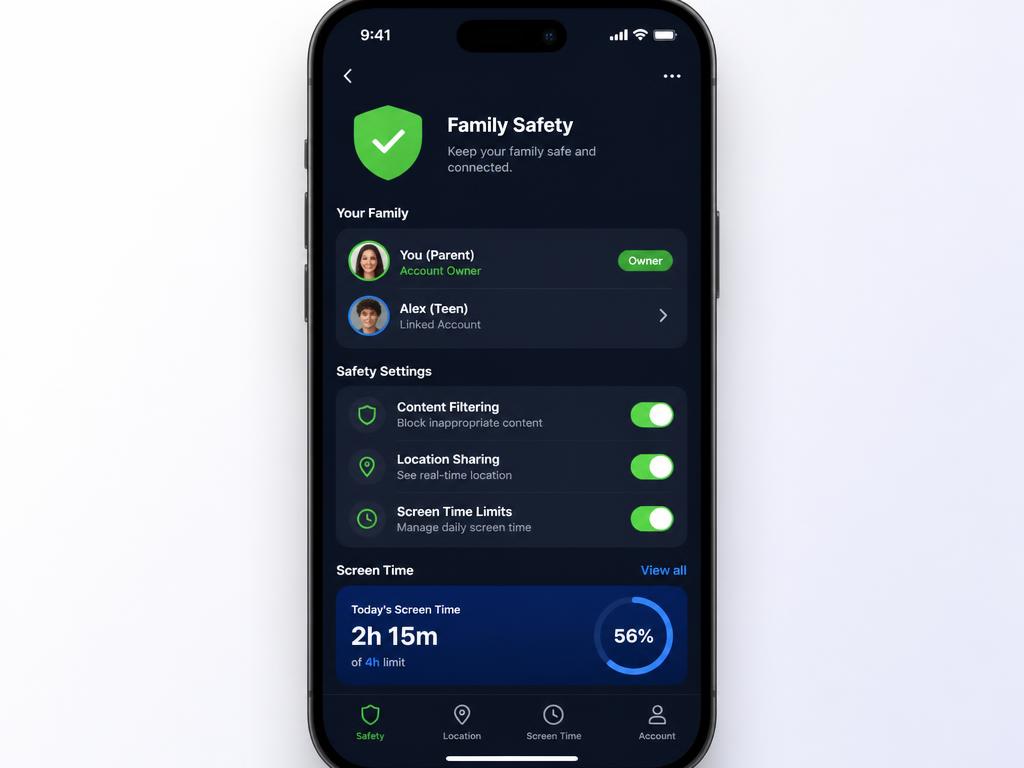
Safer defaults for teens, without spying on them.
The Family Safety Layer is in the current iPhone and Android app. It gives families real controls — screen time, messaging limits, safety settings — while leaving a teen's private conversations private. Safety and trust, not surveillance.
The Family Safety Layer is implemented and available in the current iPhone and Android app — it is not a roadmap item. Age-appropriate defaults, parent-linked child accounts with screen-time and safety settings, restricted messaging for younger accounts, prioritised child-safety reporting and no ad targeting to minors are all active today.
For us, safe social media for teens means four things working together: verified accounts so teens interact with real people, private-by-default settings on younger accounts, end-to-end encrypted DMs so private conversations stay private, and no behavioural ad targeting to minors. Every part of the product is built around those defaults — read our full Child Safety Standards Policy for the detail.
Younger accounts get private-by-default settings, stricter messaging permissions and limits on discoverability. We do not target ads at minors.
Anyone can report a post, profile, chat or listing. Reports relating to minors are prioritised and reviewed under our Child Safety Standards Policy.
We give families safer building blocks — verified community context, reporting tools and visible trust signals — rather than surveillance over a child's account. We recommend ongoing conversations between parents and teens about online safety.
Safegram cannot replace adult supervision. Parents and guardians should help children set up their account, talk about who can message them, and review reports together.
Yes. The Family Safety Layer is live in the current iPhone and Android app — age-appropriate defaults, parent-linked child accounts, restricted messaging for younger accounts, prioritised child-safety reporting and no ad targeting to minors are all active today.
There's no risk-free platform, but the safest social media for teens combines verified identity, encrypted DMs, private-by-default accounts, prioritised child-safety reporting and no ad targeting to minors. Safegram is designed around all five of those defaults.
Safegram applies stricter defaults for younger accounts — private profile, limited discoverability, restricted messaging — and does not show ads to minors. Users must still meet the minimum legal digital age in their jurisdiction with proper parental consent where applicable.
Safegram is designed with safer defaults for younger accounts and we operate under our published Child Safety Standards Policy. No platform is risk-free, so we ask parents and guardians to stay involved.
Users must meet the minimum legal digital age in their jurisdiction, with proper consent where applicable.
Safegram supports parent-linked child accounts for screen-time limits and safety-related settings, but does not provide surveillance tooling over a teen's private conversations. We encourage open conversations and joint account setup.
Reports involving minors are prioritised. We can remove content, restrict accounts and refer to authorities under our Child Safety Standards Policy.
No. Safegram does not target ads at minors.
No. We do not sell personal data and we do not run ad profiling on any account, minor or adult. Safegram is not funded by advertising.
No. Age and identity checks are handled by our verification partner Didit, an ISO/IEC 27001 certified, EU-regulated provider. Safegram stores only the outcome — never document images or biometric data.
No. Parent-linked accounts control safety settings and screen time, not surveillance. Messages stay end-to-end encrypted, including from us.
Data is processed in the EU under GDPR. You can request export or deletion at any time from the app or via our privacy page, and we delete on request rather than keeping a shadow copy.
Privacy-first social and a verified marketplace, built in Dublin. Free on iPhone and Android.